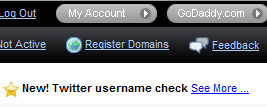
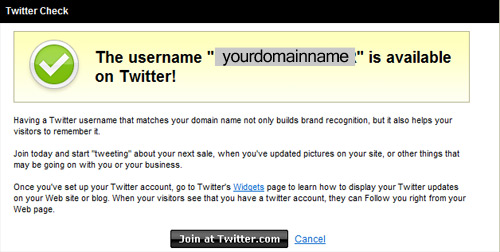
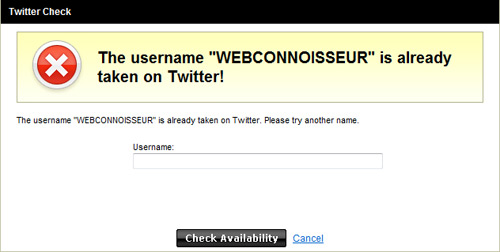
Just over a month ago, I was shocked when I was force-fed a twitter screen takeover while looking at my domain names registered at GoDaddy. Immediately, I did some news searches to see if GoDaddy had purchased Twitter because it seemed very out of place. There were no such announcements. In fact, there was verylittle news about this development.
Every time I’m in my account tweaking my domains, I can’t help but notice the twitter promotion overload. I can’t help but wonder why GoDaddy would take such a keen interest in helping to fuel more twitter accounts. From a service perspective, it is pretty lame because it is already incredibly easy to check name availability and sign up for twitter. I could think of a hundred other features GoDaddy should build and promote instead. If it were a two-way arrangement, where Twitter promotes domain registration for Twitter user names, then I could see the benefit.
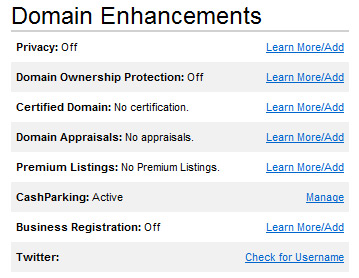
So why do you suppose GoDaddy is pimping Twitter so much? Is GoDaddy going to buy Twitter? Is Twitter paying GoDaddy for this treatment? Is GoDaddy’s product development team overly caught up with Twitter & group-think led them to believe this add on would separate them from other registrars? I have no idea, but it will be interesting to watch this over time.
Here are more screenshots showing how much GoDaddy is pimping out Twitter within their domain dashboards:
If you think about it, LinkedIn is a natural beneficiary from massive layoffs. Upon being laid off, here are some user activities LinkedIn might not see otherwise:
Status updates to let others know about layoff
Recommendation requests to co-workers
Recommendations for co-workers
Profile updates and employment history updates
Status updates about job seeking
LinkedIn personal network job searches
Contact info lookups to find names & phone numbers to fill out unemployment benefits job search logs
Network inbox emails to ask for help with employment
Outside the unemployment-related activities I list above, there are, of course, many other activities that you might see even in healthy job markets like looking up potential bosses, researching organizations, growing network, Q&A activity, etc.
LINKEDIN UNEMPLOYMENT CORRELATIONS
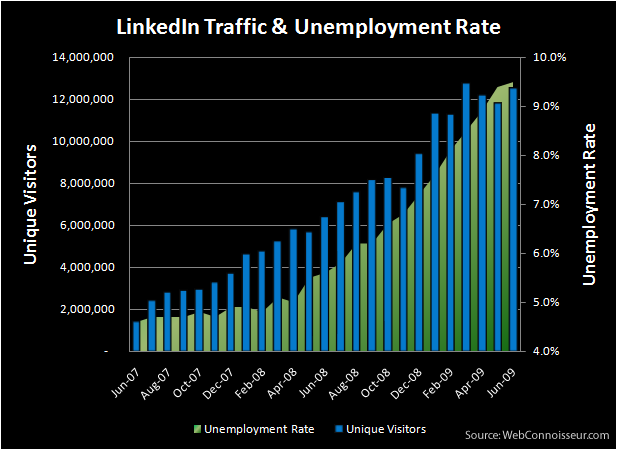
The numbers don’t lie: LinkedIn certainly benefits from this increase in activity and the activity is well-documented. In terms of pageviews, LinkedIn went from 272 million pageviews in March ‘08 to 872 million pageviews in March ‘09 (252% growth according to Compete.com data).
Not only does an increase of unemployment catapult activity (as measured by pageviews), it also greatly benefits reach (as measured by uniques). Check the graph below that I created that shows LinkedIn uniques visitor growth and the unemployment rate for the past two years:
Read this piece on Valleywag today about the New York Times hiring their first-ever Social Media Editor.
Here’s the NYT description of their social media editor:
One of the bracing things about this topsy-turvy media landscape is that you can wake up one morning and find yourself actually doing something you never thought you’d even think about. Take Jennifer Preston. In 25 years in the news biz, she’s been plenty of things: Reporter (cop shop, City Hall, Albany, etc.), editor (political editor, section editor, administrative editor, etc.) and even circulation marketing manager (at New York Newsday). But still, did she ever think she’d wake up one morning as “social media editor”?
No, she didn’t but yes, she did. That morning was this one.
Jennifer is our first social media editor. What’s that? It’s someone who concentrates full-time on expanding the use of social media networks and publishing platforms to improve New York Times journalism and deliver it to readers.
…She will help us get comfortable with the techniques, share best practices and guide us on how to more effectively engage a larger share of the audience on sites like Twitter, Facebook, Youtube, Flickr, Digg, and beyond.
Knowing the NYT has the 2nd most popular Twitter following and a great number of journalists with accounts on Twitter, I thought it would be interesting to check out who Jennifer Preston is and if I knew her from past social media events I have attended.
Turns out her Twitter account was locked, according to Valleywag. Looks like she opened it up to the public in response to the article, but she had yet to post her first tweet. I looked around for a non-NYT account for her, but didn’t find any. One place I looked was Linked in. I was shocked to see she only had 13 connections (especially for someone who works for a large publisher).
I tweeted my findings, which may have spurred her to post her first tweets (she now has 3). From my perspective, she’s got less experience with twitter, digg, youtube, blogging, etc. than any college intern I’ve ever worked with.
Either the New York Times is trying this as an experiment, or they have effectively set a very low bar for what is considered a social media expert.
If you are on Facebook and haven’t had the pleasure of reading a 25 Random Things About Me note about one of your friends yet, you are missing out. Normally not a fan of chain letters or tagging memes, I will admit the 25 Things activity on Facebook is fascinating.
History of Facebook 25 Things Notes
Facebook notes were launched on August 22, 2006, but didn’t receive heavy usage until 2009 thanks to a new viral phenomenon that started off as “25 Random Things About Me.” Memes using notes on Facebook are nothing new, entire websites have been put together to catalog and inspire various memes-most as lame as the emails that have been going around for over a decade.
The Velocity of 25 Things
The earliest entries I can find via various search tools for 25 Things is mid-January. I really saw it taking off in my personal network starting in February. Using Google trends, I compared 25 Things searches to searches for an older site people might be familiar with: 43 Things.
As you can tell from the chart, 25 things searches increased rapidly, easily overshadowing 43 Things despite the fact that users won’t find Facebook notes entries doing this search, nor will they find definitive information about the origins of it.
How to Find 25 Things Notes
If you do want to find all your friends 25 things postings, I suggest you follow these steps:
1. Login to Facebook and make sure you are on the main page (click Home if you are not sure).
2. Click the drop down arrow for more feeds (blue arrow next to live feed button)
3. Choose notes.
4. Scroll down and you will likely see activity around 25 Things postings.
5. Click show more posts at the very bottom if you want to look for more postings.
Facebook 25 Things Learnings
There are things we can all learn from Facebook’s 25 Things success:
Patience is important in business. Facebook could have easily scrapped notes long ago due to low activity.
Never underestimate user-generated content.
Viral successes are often luck
Providing a platform where UGC viral successes can happen is important
I noticed a lot of people commenting on how Facebook didn’t make sense to them until they started reading other people’s 25 Things posts – this simple meme has created an amazing amount of value for Facebook and their traffic reflects it:
I wrote a guest post over and IndieGoGo, a cool fund raising and awareness tool for filmmakers, on the topic of using SEO (and SEM) to attract an audience for your film.
Here’s a teaser:
Making a film is a big enough challenge in itself, but if you are like most low-budget independent filmmakers, you’ll quickly discover that finding an audience for your film can be even more challenging.
Outside of widely known marketing methods like submitting to festivals, inviting people to special screenings, and attempting to make friends on social networks, most filmmakers fail in allowing their audience find them on their own.
In an effort to get more entries into the 2009 Webby Awards, the Webby Awards teamed up with some online video rockstars to promote entering. Eventually there will be five videos, but here are the first two:
I’ve had the pleasure of judging the Webby Awards, the Web 2.0 awards, an international pageant, and now the Mashable Open Awards.
Like many awards, there is the judges choice and the people’s choice (both an honor to win for any website). Below is the form you can use to submit your choice (cast your vote before midnight Sunday, November 30th):
Just received an email from LinkedIn announcing LinkedIn Apps. Here’s a quick look at the apps they’ve launched with and my thoughts on how they might help you with your career reputation management.
“Today we’re announcing many more ways to interact with your network on LinkedIn. Whether it’s a new way to create projects and collaborate, share information, customize your profile, or gain key insights, the new LinkedIn Applications deliver.”
LinkedIn Applications available at launch (in decreasing order of first-glance importance) with my quick thoughts:
Company Buzz by LinkedIn – Very handy way for non-twitter savvy users to gauge what people are saying about their company.
WordPress on LinkedIn – Another way to promote your blog to your connections or future connections.
Google Presentation on LinkedIn – A way to share some of your work in a public way (only presentations right now, but wouldn’t be surprised to see other Google Docs added soon). Great way to promote your presentations.
Bloglink on LinkedIn – A handy way to keep up with your business network’s latest blog posts.
TripIt on LinkedIn – Keep tabs on where your network is traveling. May help you better connect with your network in person.
SlideShare on LinkedIn – Share, view and comment on presentations from your network. Use in a promotional way, or use it for pre or post live presentation feedback.
Amazon on LinkedIn – Insight into what your network is reading.
Box on LinkedIn – Share files on your profile and/or collaborate with your network.
Huddle on LinkedIn – Helpful private project management collaboration abilities.
Obviously many of these applications are available on other sites or in other ways, but having them associated with your LinkedIn business network may bring about some interesting opportunities. It will be interested to see how popular these become and what other applications are added.
So far, I’ve installed Blog link (so far first person in my web savvy ~400 person network), Wordpress (more control and better profile display than blog link), TripIt (two connections on it thus far), and company buzz (didn’t add to my profile, however). Of the three, I noticed blog link may suffer from speed issues (plus I removed it from my profile as I didn’t like the way it displayed) and company buzz doesn’t work very well compared to other twitter search tools.
Love to hear your experiences and thoughts about LinkedIn Apps.
Haven’t seen anyone do this yet on Facebook, so I thought I’d stir the pot and see if this Facebook prank spreads.
Facebook Assault Tagging
Facebook is nice enough to automatically publish any photo of you to all your friends if someone simply tags a photo of you. This has caused embarrassing moments for many people, but there’s a way to guarantee embarrassment:
1) Upload a funny or nasty photo
2) Tag it as your friend
3) All their friends will see the new photo feed of your victim.
4) Watch their friends start commenting on the hilarious photo
5) Prepare to be tagged yourself (you can untag a photo of you, but you have to be on it).