Archive for the 'Analytics' Category

Omniture Buying Visual Sciences for $394 Million

Friday, October 26th, 2007

Say it ain’t so. Omniture (Nasdaq: OMTR) is buying Visual Sciences (Nasdaq: VSCN) for a reported $394 million. The combination of the two best-of-breed analytic providers can’t be a good thing for companies using web analytics solution providers.

Omniture states that they will rapidly and grow their technologies, but I don’t see a near monopoly being a good thing for most companies. Competition is good. I’ve been a customer for both companies and felt they really were by far the two best offerings in hosted analytic solutions.

It will be interesting to see if regulators allow the purchase because it feels like it will be too close to a monopoly to me. I assume Visual Science stockholders will approve the purchase as the company has been riddled with problems, losing many key employees to Omniture. The acquisition is expected to close in mid-2008.

Congrats to Omniture. This news shows just how strong Omniture has become, especially after purchasing Offermatica last month.

Detailed Google Search Referrer Data

Tuesday, October 2nd, 2007

Found some interesting nuggets when I decided to narrow in on Google referrer data (as reported by Omniture) from one particular high volume keyword.

The word was “lasagna” and when I dug into the Google data, I noticed some interesting things. Google shares the following data in the referrer URL. I compare each search type to the standard “lasagna” search in google (without quotes) to protect the actual traffic volume for the high-ranked website.

Google Searcher Keyword Variations:

Standard lasagna search: 100%
(this is the search I base the rest of the data on)

lasagna misspelled & clicked on google did you mean link: 74%
(this was much higher than I anticipated - people probably ignored the “g” in lasagna).

Lasagna search: 8%
(I guess some people figure capitalizing the first letter will get them better results)

lasagna_ : 4%
(the underscore denotes a space after the search term - I guess some people can’t help but drop their thumbs down on that nice big spacebar)

Google Searcher Behaviors and Platforms:

lasagna search, but clicked search button: 40%
(looks like most people hit enter, but some take the time to click the search button)

standard lasagna search via Firefox: 19%
(firefox users continue to grow and Google likes tracking them)

standard lasagna search via iGoogle: 6%
(looks like some people are using iGoogle as their homepage)

Google Non-U.S. Data

UK standard lasagna search: 9.5%
Google UK misspelled did you mean correction: 34.4%
Google UK lasagna search, but clicked search button: 2.5%

Looks like our friends from the UK need to work on spelling. Misspelled version is 4 times more common than the correct spelling!

Google Canada standard lasagna search: 23.6%
Google Canada misspelled did you mean correction: 15.1%
Google Canada lasagna search, but clicked search button: 8.2%

Our friends from Canada are a little less mousey (hit enter instead) and slightly better spellers than Americans.

We can’t draw too many conclusions from this data, but it does highlight some of the data you can get from looking at your referrer data more closely. I invite you to spot check a couple terms that you rank for and share your findings in the comments.

The Beauty of Seasonality in Data

Friday, July 20th, 2007

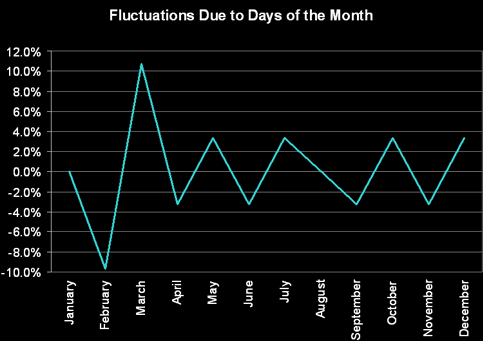
In terms of dealing with data, many companies struggle with seasonal fluctuations.
seasonality of data
Some of the most common seasonal fluctuations I’ve seen are due to:

  • Holidays - like Christmas, Thanksgiving, Labor Day, etc.
  • Hallmark Holidays - like Valentines day, Mother’s day, etc.
  • Traditions - like New Year’s resolutions, etc.
  • School-related events - like spring & summer breaks, football season, homecoming, proms, school year starts, graduations, reunions, etc.
  • Actual Seasonal changes - like the coldness of winter, summer heat, rainy season, etc.

While some people see seasonality as the bane of their existence, I see it another way. For me…

SEASONALITY = OPPORTUNITY

They way I see it, the more complex something gets, the bigger the opportunity for those who are able to deal with it because the barrier to entry is high and the number of savvy companies that can figure out how to properly deal with it properly are low.

Seasonality mucks up data. Companies that don’t learn to deal with it correctly will make bad decisions. Not realizing that Easter falls in March next year could cause you to mimic activity from this year 2-3 weeks late, but not realizing that Easter was the cause of your increased sales this year is an even bigger missed opportunity.

To best tackle seasonality, mine your data and mine external industry data. Look for monthly, weekly and even daily fluctuations. Keep tabs on w/w, m/m and y/y growth rates. Also, keep a calendar of events that may cause fluctuations in data (site redesign), so you don’t mistakenly attribute that fluctuation to something else. And when you can identify a source for the seasonality, make an action plan for next year.

Understanding your seasonality is the first part. Acting upon the intelligence is the second. For example, if a weight loss company discovers that summer high school graduations cause a burst of new customers in June, target your late May to June advertising to reunion planning sites like facebook, classmates, yahoo groups, reunions.com or bidding on long-tail local reunion terms like “ehs 2007 reunion” (note: not a single advertiser has figured this one out yet) or “roosevelt high school 1994 class reunion”. Even consider creating a special plan targeted to those customers (Rapid Reunion Weight-Loss Program).

To be fair, many companies, especially retail, have seasonality built into their veins, but even these types of companies could easily improve if they understood what exactly is driving people’s interest and the exact timing of it.

If you are in a business affected by seasonality, be happy that your data has a pulse:

seaonal data chart

instead of a a flat line like this (call life support, we’ve got a flatliner):

non-seasonal data chart

Web Analytics Provider Data Tested

Tuesday, May 8th, 2007

I love it when someone takes the time to research and answer a question that many people have. In this case, Stone Temple decided to put several web analytics providers to the test by installing multiple solutions on a few sites to see the differences. Their results can be seen here. Be sure to read the whole report because some of the differences were due to implementation mistakes.

Here are what I found to be the key findings:

  • Be prepared for different numbers whenever switching analytics packages. None seem to count the data in the exact same way.
  • 3rd-party cookie deletion rate exceeds 1st-party cookie deletion by about 13%. More proof that you shouldn’t use 3rd party cookies.
  • WebTrends, ClickTracks and Google Analytics may over count uniques and WebSideStory (HBX) and Unica may undercount.
  • ClickTracks may severely undercount page grouping data.

Potential flaws with the study:

  • Just four sites used. Pre-screened by sites that had large enough paid search spending.
  • Of the four sites, none are high traffic sites. I could only find two of them in ComScore and the site with the most traffic only sees about 200k U.S. visitors a month. I’d love to see the same study on sites with more visitors which would make the datae much more reliable. reliability of the data.
  • In an effort to “protect” the participating sites from sharing their real traffic volume data, daily uniques time period was not disclosed, plus each analytics package probably has different rules on what constitutes a daily unique. For example, some may cut off a “visit” at midnight, but let it carry to the next day as another unique “visit,” others may not. Another example is that some may choose to expire visits at different time periods (30-minutes of non-activity, etc.). I would have liked to see a weekly or monthly uniques count comparison instead.
  • When I first heard of this study I was excited that we may finally learn a lot about the different providers and which are the best solution, but was a bit disappointed when the results were released. Sounds like we may learn more when the final results are released, but it may be more along the lines of implementation findings. I hope it inspires more people to do more tests.

Please Stop Quoting Alexa Data

Tuesday, March 20th, 2007

Far too often I hear people quoting Alexa data. Even last week, at the 2007 Omniture Summit I witnessed Tim O’Reilly using Alexa charts to prove Web 2.0 success in front of 1,000 smart web analytics professionals. I know I couldn’t have been the only person in the crowd to notice. For Tim’s benefit, and anyone else who uses Alexa Data, please take note:

ALEXA DATA IS TREMENDOUSLY FLAWED

I touched on this in a competitive intelligence metrics post back in October, showing that Alexa’s data is less accurate to determining true site traffic then the # of characters the domain name, but now I’d like to really illustrate how far off Alexa’s data is.

Many people have pointed out Alexa’s data is biased towards a certain crowd and can be manipulated (see the links at the bottom of this post), but none have illustrated the margin of error that I’m about to. Below I take a look at two very different sites with very different traffic stats.

Site 1: Allrecipes - Allrecipes is a leading food site - as you might expect, Allrecipes users are similar to what you might see on the Internet as a whole, though slightly more female.

Site 2: SEOMoz - SEOMoz is a site that caters to the SEO and online marketing community - a crowd more likely to install the Alexa toolbar.

Using Alexa, you might conclude that SEOMoz receives more traffic than Allrecipes:

Alexa Reach Chart:
Alexa Reach

Alexa Rank Chart:
Alexa rank

Both sites are very popular within their target audience, but despite what Alexa may show, Allrecipes has much more traffic. Let’s face it, more people cook food, then perform SEO! In fact, if you were to populate the above charts with actual data, SEOMoz would be a flat sliver near the x-axis. Here’s some real data from Dec. ‘06:

Allrecipes Unique Visitors: 11,023,187
SEOMoz Unique Visitors: 102,523

If you were to use Alexa charts to draw conclusions about either site based off real numbers for one site, your traffic estimates would be off by approximately 11,842%. Numbers that big are often difficult to grasp, so I like to put it in perspective. A mistake of that magnitude is the equivalent of:

  • The CIA mixing up the population of Ohio for China.
  • Your accountant saying you owe $1,000 to the IRS, when you really owe $119,417.
  • A cop pulling you over for doing 60 in a 30, when you were really going half-a-mile-per-hour.
  • Telling your spouse you’ll be home in three hours, then showing up 15 days later.

These are mistakes that none of us could get away with, so why should we let Alexa?

I’m not the first to prove Alexa data is flawed. Here are links to other Alexa skeptics:
Peter Norvig, Paul Stamatiou, Josh Pigford, Matt Cutts, Rand Fishkin (thanks for the data!), Greg Linden, Bruce Stewart, Alex Iskold, John Chow, and Markus Frind.

Digg my article


How Users Print Pages On The Web

Wednesday, February 7th, 2007

I remember about a year ago I was desperately searching for data on how people printed pages on the web. The reason I was curious, is because I noticed flash ads would often mess up pages printed straight from the browser, often not printing the content of the pages. This is a bad user experience which could cause visitors to start using a competitor’s site instead.

Unfortunately, I was unable to locate any studies. I thought with the millions of sites that have “printer friendly pages” that someone would have published the results. I decided to do the research myself and slip it into a survey during some pre-redesign research for a top 150 website. I surveyed over 2,000 users, asking them how they printed pages on the web. The results may surprise you.

Here are the results:
When printing articles or pages on the Web:

  • 19% of users use File > Print in their browser
  • 63.1% of users use the printer-friendly links on the page
  • 2.5% of users use the Control-P command on their keyboard
  • 12.3% of users copy and paste the text into Word
  • 3.1% of users copy and paste the text into an email or other application

A couple notes about the survey participants. The site this was conducted on would be considered a sampling of the average Internet user. A site catering to web-savvy users would have different results. The site has also long had “printer-friendly” links, so long-time users would be more likely to use them. To remove some of the long-term user bias, here are the same results but filtered by only users who have used the site for less than 3 months (over 375 users).

Here are the results for newer users:
When printing articles or pages on the Web:

  • 25.3% of users use File > Print in their browser
  • 49% of users use the printer-friendly links on the page
  • 3.1% of users use the Control-P command on their keyboard
  • 17.5% of users copy and paste the text into Word
  • 5% of users copy and paste the text into an email or other application

I realize a survey isn’t the most accurate method to get at this data, but this data is difficult to collect any other way because it is impossible to track anything other then the printer-friendly pages of a site without conducting an expensive in-person behavioral study (preferably on the users own computer).

If you know of any other research on this topic, please share it in the comments.

Must-read Interview of Marissa Mayer

Saturday, January 27th, 2007

Over at SearchEngineLand, Gord Hotchkiss launches his new column “Just Behave” with what I would characterize as one of the most informative Google interviews I’ve ever read. It’s a shame it was posted on a Friday. Check out the Marissa Mayer interview.

The interview confirms a number of theories I’ve had, especially about their one-box results and how and when they decide to show sponsored results in the left column. We already knew their ranking algorithms were far superior to MSN and Yahoo, but they’ve even got well-designed algorithms to decide where to place ads on a given search, whether to show news and if they should give a site in the organic results the magic one-box (the one that shows multiple links for the top site).

Google’s attention to user-experience is the main reason Yahoo and MSN haven’t caught up. MSN continues to focus on selling ads rather than improving the search experience. MSN is banking on IE 7 and adding MSN search to more MSN properties as their primary methods for increasing market share, but it won’t work because the search experience is so poor.

Beefing up the MSN AdCenter abilities won’t help either. Advertisers are already impressed with AdCenter, but they want more traffic. MSN’s focus is terribly off and I won’t be surprised if MSN’s market share in the search industry contines to slide. Here’s a key indicator: right now MSN is hiring 49 engineers for AdCenter, but only 9 for Live Search!

Avinash Has Fun With Analytic Providers

Wednesday, November 8th, 2006

If you are into web analytics, but haven’t visited Avinash’s website, I highly recommend it. Take a look at this post where he challenges analytic providers to tell him what makes them unique (turns out most of them say the same thing).

Playing With Numbers

Wednesday, October 18th, 2006

Rand posted a fun article on comparing website analytics with competitive intelligence metrics. Being in the search and analytics fields, I found his data very interesting. However, I’d argue that these sites are not ideal for comparing the two. Non-SEO focused sites might have higher correlations between the two sets of data because SEO folks are more likely to play tricks with links, Alexa, Technorati, etc.

Regardless, I thought I’d take Rand up on his offer to post new information given the data he shared. The first thing I did was to hone in on the sites that get at least an average of 100,000 visits. I wanted to eliminate the noise of sites with 1-79k pageviews per month, which might be skewing the data. This leaves me with 8 higher traffic sites to measure upon. The correlation results I get using the same method Rand did results in this:

  1. Alexa Pageviews (0.70)
  2. Technorati Rank (0.53)
  3. Alexa Rank (0.49)
  4. Ranking.com Rank (0.32)
  5. Yahoo Links to the Domain (0.23)
  6. Bloglines Subscriptions (0.121)
  7. Number of Technorati Links (0.120)
  8. Yahoo Links to the Blog URL (0.119)
  9. SEOmoz Page Strength (0.04)

The rest had negative correlations, with NewsGator Subscribers being the worst indicator among the bunch. By focusing on the higher traffic sites, we see different correlation scores.

Then I thought to myself, “there must be a better measure.” So I thought long and hard and came up with the following formula: 100-[character count]

The character count is the # of characters in the URL for each site, meaning sites with less characters to type in will receive a higher score. SEOmoz, with 22 total characters in its full url string, would receive a score of 78, while SEJournal would only receive a score of 65 (35 characters in the full URL).

Matching up my new character-count competitive intelligence measurement, I receive a correlation score of 0.90, beating out all the other measures presented!

Advice to any SEO hoping to obtain traffic to their blog: simply go with a shorter URL.